Numerical references
Units, uncertainty, coverage and CMC calculations are exercised against defined numerical cases and published reference examples.


Asset + Standard
Run customer service, equipment, logistics, people, communications and the business in one platform. Standard by MetraSlate: Metrology Edition adds built-in CMC and uncertainty budgets, manual calibration, onsite work and the technical record behind the certificate.

Choose the work you want to understand
Explore a complete workflow, including what the software does, the records it connects and the decisions your people control.
Give employees the tools to communicate, obtain resources, request support and work across locations.
Team chat, connected mail and customer service bring the people responsible into the same working environment as the customer, equipment and service record.
Bring supported calling into the customer workspace, with authorized account context, observed call history and clear service outcomes.
Connect the employee's day, schedule, time, collaboration and internal service requests to the operating records the business already uses.
Use the shared Asset foundation for equipment identity, location, custody, service history and the resources employees need. Standard carries that foundation into specialized laboratory work.
Use the employee store for equipment and supply requisitions, then connect internal service requests to equipment, priorities, decisions and the people responsible.
Publish recorded briefings, training and operational updates for the whole company or a team channel, where staff already work.
Organize locations, regions and people around the operation you actually run, with local working views and a connected company picture.
Connect the first enquiry, quotation, pickup, work order, customer decision, released certificate and account record.
Capture enquiries, qualify leads and manage the sales pipeline. Keep customer relationships, follow-up, forecasts and quotations connected to the work your laboratory delivers.
Give customers a connected place to plan service, request and approve work, arrange collection, follow their equipment, retrieve released certificates and manage the account with your laboratory.
Coordinate instrument-level service, collection, receipt, laboratory or onsite work, technical review and return through the same customer and equipment records.
Connect customer pickup requests, delivery stops, driving order, destination details and recorded outcomes to the equipment and service behind the trip.
Retain the customer’s agreement, connect the invoice to the accepted work, and follow recorded receipts and balances.
Build capability budgets, perform manual calibration and preserve the technical basis of the result, in the lab and onsite.
Standard provides the manual-calibration worksheet, measurement evaluation and technical record for laboratory work.
Create scope entries and contributor budgets, calculate supported endpoints, and publish a reusable technical curve. Keep numerical support separate from accreditation approval.
Follow the actual standard contributions, resolution, combination, coverage and decision basis from the recorded observation to the reported uncertainty.
Explore the calculator and statistical reference tools, with the distinction between supported calculations and planned measurement-system studies made explicit.
Connect temperature, elapsed time, warm-up, mode, frequency, loading and recorded environmental conditions to controlled specifications and instrument-specific corrections.
Inspect the intended use, inputs, units, assumptions, formula, numerical example and limits of a calculation before applying its result to the laboratory's work.
Prepare a device with the right work-order lines, capture raw observations locally and bring them back into Standard's uncertainty, review and certificate workflow.
Quality belongs to the complete service. Connect findings, technical evidence, corrective actions, controlled documents and customer consequences.
Configure the process, understand operating records, evaluate integrations and choose whether AI belongs in your environment.
Configure supported responses to operating events. Inspect the conditions, authorized action and recorded outcome.
Define subjects, measures, periods, filters and groupings. Review the result with the records that contribute to it.
Bring email, sign-in and calling into the workspace where your team manages customers and work records.
Review organizational identity, company boundaries, application permissions and connection handling in the configuration you intend to use.
Numerical reference cases, controlled-record checks, permission refusals, database integration tests and browser workflows accompany the product from calculation kernels through release preparation.
Run the operation through controlled records, calculations and workflows. Add model assistance where it helps, with a supported model and deployment approach suited to your data-control requirements.
Customer experience
Customers request quotes and pickups, follow equipment, respond to service decisions, retrieve released certificates and manage account actions when the laboratory is ready.
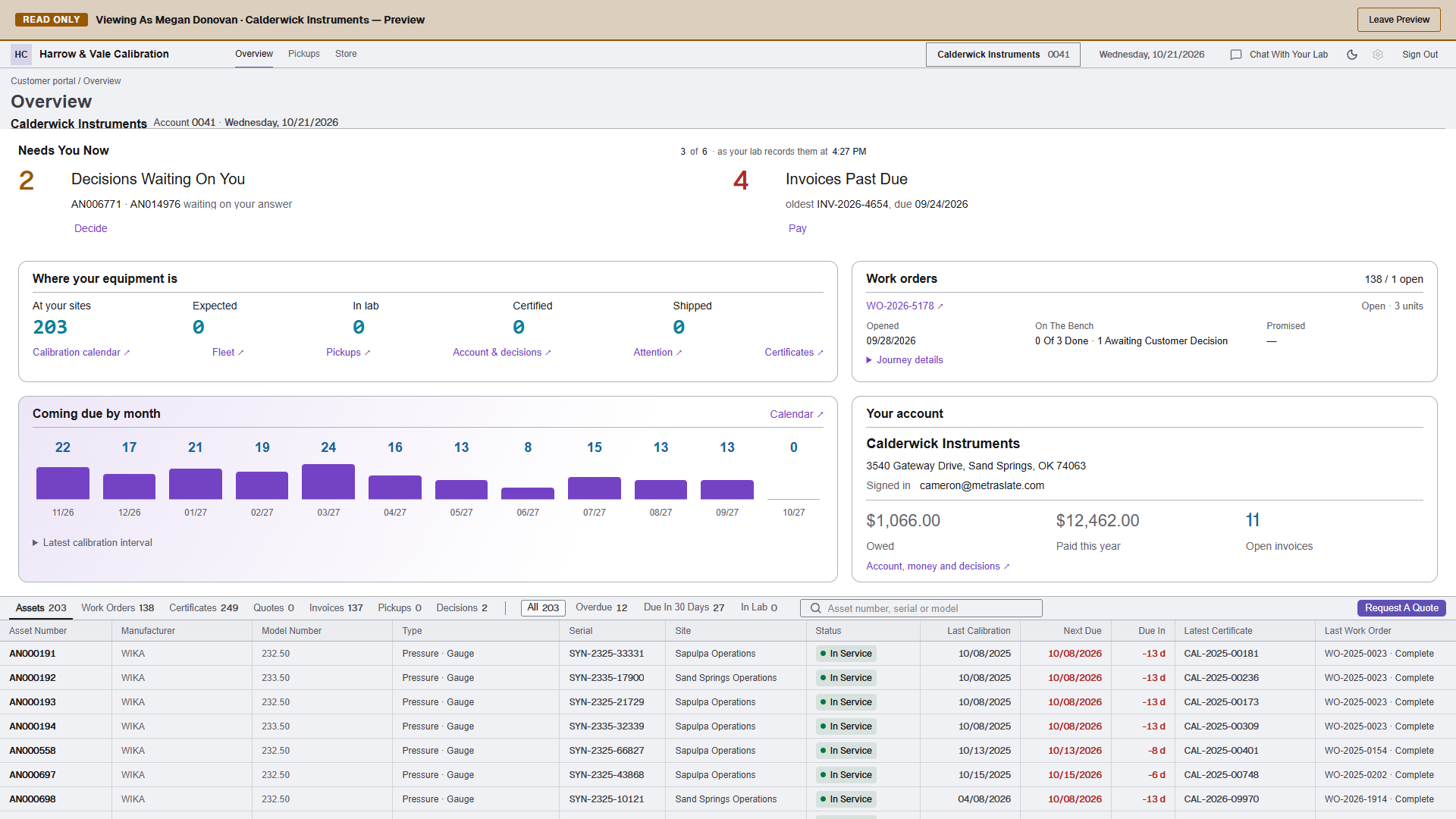
The request identifies the instruments the customer needs serviced.
Requirements, site and collection details travel with the request.
The approved revision and purchase-order information remain connected to the work.
From request to return
Customers can request work, supply pickup details and find released documents themselves. The laboratory acts on the same records, rather than re-entering an email request or searching for a certificate attachment.
Explore Billing and Account RecordsBusiness reporting
Define the report’s subject, measures, period and audience. Confirm the subjects available in your pilot.
Engineering and choice
The engineering process checks numerical cases, record integrity, authorization, transactions and working interfaces. Your organization chooses whether to add an approved AI model.
Engineering throughout development
Units, uncertainty, coverage and CMC calculations are exercised against defined numerical cases and published reference examples.
Tests exercise pinned definitions, retained results, controlled corrections and the evidence a later reviewer needs.
Tenant, customer, site and role checks include refusal cases, so an unauthorized request is part of the test story.
Integration cases examine duplicate input, conflicting state and the financial or operating record left after an action.
Component and workflow checks cover the controls people use, including validation, failure and recovery states.
Build, migration and release checks connect the candidate revision to the evidence needed before rollout.
A conversation about your work
Start with your items, your business, and the processes you need to manage. We’ll help you identify the right product.